I tried other things in the past, especially when I came back from China trip, and I really need to stay away from the phone during the night – otherwise I will get zero sleep. I put the phone downstairs – which would make me harder to pick up the phone. Because I need to get up, walk down the hall, walk down the stairs, and so on.
For now, I have used this Offscreen app on and off for a while, and I plan to use it more as recently I decided to cut down my screen time, especially re: my iPhone.
In the past, I have used this lock box – it was bought on Dec 23, 2020 in the height of pandemic. But kids used this pretty much as a toy, and that defeated our original purpose. Now I think for myself I have simply put my phone downstairs or put it in a drawer – to achieve something similar.
PS: I wrote quite a bit on stocks here, and recently I realized that if I can cut down looking at the stock tradings app in general, on the phone, and that will potentially have 2 benefits: 1) Reducing doom scrolling on the phone; 2) Improving performance on the stocks, by doing less trading, and make more informed trading. I have transferred 2 apps from iPhone to iPad in that spirit.
充电🔋和充满电后的使用时间大概都是2个小时左右。Note it can be used as a regular MP3 player or a headset (with microphone, paring with your smartphone), during hiking or jogging. It will provide more situational awareness because the voice you hear is going through your bone instead of the ear directly. In other words you can heard your surroundings when you are outside. (Update 09-23-2025) Just came across a similar product at local Costco a few days ago. I think it may have better quality (because it’s sold in Costco 🙂
今天(2025-09-04)发现仰泳时这个耳机的效果最好。Do you want to guess why? (hint: my ears were always under water then).
Would you like to guess what (whose) music I put on the headset? 🙂
I have a Mac Mini, and I owned it for quite a few years now. I bought it at Costco St. Peters store, at around Christmas 2021. I used to use it to get to Citrix via Citrix Workspace, the remote desktop software that I used for work. The main reason I prefer this over the company provided IGEL product is I like the keyboard and touchPad for my Mac Mini better than the IGEL’s. I no longer uses Citrix as my employer switched to another software for remote work, also they provided a company laptop for work.
But I still have the Mac Mini, and sometimes I like to see my kids use the Mac Mini, instead of the laptop. Because the Mac Mini (the desktop) is in a public location, and I know what they are doing there. My older daughter (15) has the MacBook Air too: and not surprisingly she would goof around much more – aka doing TikTok etc. compared to do real things at the desktop.
Other benefits of a desktop computer is a larger display or screen, and family members can work on something together, if/when applicable. This is similar to the good old days, when we work in office, we have desktop or large screen, we can do pair programming or debugging together.
If you have limited budget, and don’t have extra money for Mac Mini or something similar, I fully understand. And if you have an extra display, you can still connect the laptop to the external display, to take advantage of the real estate. In fact, I think I have one or two extra external displays, if you are in STL area and are interested, shoot me an email at minjie dot xu at gmail dot com, and you can pick it up at my home at Olivette (aka 橄榄村)。
Separately, I just bought a new iPad for myself. I hope to use iPad more often (instead of iPhone). This has been my goal, but previous effort (a Samsung Android tablet) has been fallen short.
First impression: this is more like a feature phone instead of iPad Nano or smartphone. For $27 (before tax), this is expected though.
I already started to use the MP3 player and I tested out radio feature (it works). I haven’t tried the earphone comes with it. Right now I am using Apple EarPods. It meets my basic need.
Note another reason I need the MP3 player is it has better or more powerful battery than my current iPod Nano – it still works, but I don’t know how long it will last – I owned it for about 12 or 13 years.
PS:
I am thinking that I probably still will get the iPod Nano from eBay or somewhere. Ideally an iPod with good battery. Separately I bought the USB C EarPods from Amazon and really liked it too. I gave my old USB C EarPods to S6 for her school work (she has a school iPad with USB-C port, and she uses the EarPods for Map testing etc.)
Update (07-03-2015) It seems the player will drag the voice of a song, similar to how cassette player works when it runs out of battery or power. I need to verify it’s indeed the case. Once again more than 10 year old iPod Nano seems doing a much better job than this latest and greatest MP3 player 🙂
(Update 02-21-2026) I bought a refurb iPod nano from eBay over the holidays, and I sold the MP3 player I mentioned above.
The recommendation has increased the search for “iPods” on EBay more than 1,200 times an hour globally between January and October 2025, according to the company. The iPod third-generation models saw a 50% increase in average sales price from global EBay users in 2025 compared with 2023. The iPod Nano third generation saw a 60% increase, while the iPod Classic sixth generation had a 40% increase.
(Update 06-30-2025) After a bit back and forth, the current status: the right AirPod has 18% battery, the left – zero. Will hang on for a bit (charing etc.) before finally ditching it to the local Apple Store 🙂
(Update 06-24-2025) It seems the battery didn’t last long. Out of battery after about 30 mins or so usage. I will continue monitoring.
(Orinigal 06-23-2025) 我用AirPods 和在eBay上卖一些小东西以来,可能最不可思议的一件事。Most incredible thing happened to my AirPods Pro 1st Gen, and in my 20 years eBay selling journey. Let me elaborate below.
Today I decided to try the “returned case” with the AirPods Pro 1st Gen that I left at home. First I charged the case and the AirPods. And then I used it with my iPhone 16, and it worked! My phone says “(my old daughter’s 1stst name)’s AirPods Pro”.
Are we talking about Headless chicken 🐓 or dead cat 🐈 bounce?
AirPods, top to bottom, Pro 1st gen, 3 and 4
Death Sentence
I sold the case via eBay in Apr 2025, as I cannot make the AirPods to work. So I thought the AirPods is already dead due to the age. I tried to charge the AirPods a few times, but it couldn’t connect to the phone after charing. Before all that we were visiting China (summer 2024), and I did recall sometimes my wife would take this away from her. And my wife may have left the AirPods Pro 1st Generation in her drawer for a long time. I am mildly annoyed by my wife policing our older daughter’s AirPods usage, if leaving it in her drawer accelerated the death, obviously I wasn’t happy, but probably at the same time I don’t want to fight my wife on this. There is this slogan: there are something in life money cannot buy; for everything else, there is MasterCard.
Now I think about it, perhaps leave it in the dust for a long time, may have helped the battery to come back to life? I know rechargeable batteries are not as predicable as the mechanical counterpart. Note I recycled my 1st AirPods at the Apple West County store. Since last year or 2, I am beefing up the eBay side business, and I was thinking maybe I can just sell the case because I assume the case is good.
I paid $159.87 for Apple AirPods Pro (series number: SH36DK17G0C6L) at Amazon on November 25, 2020, and I just saw it’s $219.99 on Amazon now.
I am not sad. The AirPods pro is about 2 years old. Typical life span for AirPods is about 2 to 3 years. The pro has two advantage that my AirPods 3 doesn’t have: 1) It can connect to my old MacBook Pro (late 2012 model); 2) It has noise cancellation. For the latter I have this Anker SoundCore headset.
Customer Return
But the customer complained it didn’t work, after he received the item. Note I could not verify it end to end before ship it. Fortunately I asked for the case back this time. Nowadays normally I let customers keep the merchandise and I would still issue the refund. This time I was a bit curious regarding why the case didn’t work for the customer. Now I think it’s likely due to the fact I didn’t remove the AirPods from my Apple account or resetting the device. Again I am not 100% sure. I did google search, and I recall I removed the AirPods Pro 1st Generation from all my iOS and Mac devices.
Earlier I talked about AirPods Pro 1st gen here as well. Let me copy some stuff over:
1st Generation AirPods Pro: purchased Nov 25, 2020, on Amazon. Died and trying to sell the case on eBay now). Update 04-13-2025: sold the case on eBay.
Now at least I can use this pair of AirPods as the spare AirPods in my car: just like we have spare tire in the car, now we have spare AirPods too 🙂
It seems like it, as I noticed it started to drop connections a few times last few days (need to observe more to make sure). I recall my old 1st Gen AirPods does this a lot when it was near the end of its life. AirPods usually has 2 to 3 years of useful life, per refurb.me
I ordered it via Chase Ultimate Rewards on Nov 12, 2022. I spent15,643 Points (that’s $156.43 if we assume 100 points for 1 dollar, and this is after tax).
Assume I started using it right away, which was very likely, as I recall I got a bit tired of my then AirPods Pro gen 1. So basically, I already got 2.5 years of usage out of it.
AirPods I have owned personally
1st Generation AirPods (died and recycled at Apple store West County) – I probably bought it in year 2018. I was stunned by its seamless switching between iPhone and MacBook. I bought it after seeing a friend wearing it and he said it’s good. He didn’t lie 🙂 || I bought a similar one for my wife on Feb 16, 2020, at Amazon. Why are hers still working? Note I worn this thing quite a bit when I was working for the Mastercard, because a lot of times I don’t want to be disturbed (I sit at a corner cubicle), both for legit disturbance (people walking by or talking), or I just want peace. Later on I realized this is a hack I can deploy more because if I put on AirPods (even without listening to anything), sometimes people will assume I was on a call or listening to something, so that they won’t bother me.
1st Generation AirPods Pro: purchased Nov 25, 2020, on Amazon. Died and trying to sell the case on eBay now). Update 04-13-2025: sold the case on eBay.
2nd Generation AirPods Pro (current in use): bought at Costco U City store in year 2024. (Update 2026-08-17) Costco comes with Apple Care for one year (after the traditional one year Apple warranty). Apple is offering one year Apple Care for $15.00, and I took it – this is the 3rd year for this device.
AirPods 3 (seems about to die): as I said above, I bought it from the Chase Ultimate Rewards Apple store. || Update 04-10-2025: not sure about the “about to die” part, but it sometimes would act weird, basically the sound would be like the cassette player ran out of battery when I listened to a song on iPhone (YT Music). I used AirPods 3 for pairing with Windows Laptop too – while the integration between AirPods and Windows is not as smooth as the Mac, now I realized it has one advantage too. Let me explain, AirPods will switch between Mac and iPhone automatically, so for example, I was listening to music on iPhone, and I sit before the Mac Mini (my desktop), and open a browser and it has some video or audio playing, the AirPods would automatically switch – which was not my intension. This won’t happen (the automatic switching) between iPhone and Windows.
AirPods 4 (my 15-year-old has it): bought from Amazon on Dec 5, 2024.
Last but not least: please make sure turn on “Find My” for your AirPods: if you haven’t done so yet.
PS:
The AirPods are mostly made in Vietnam now. Apple may or may not raise the price of AirPods due to the new tariff (46%).
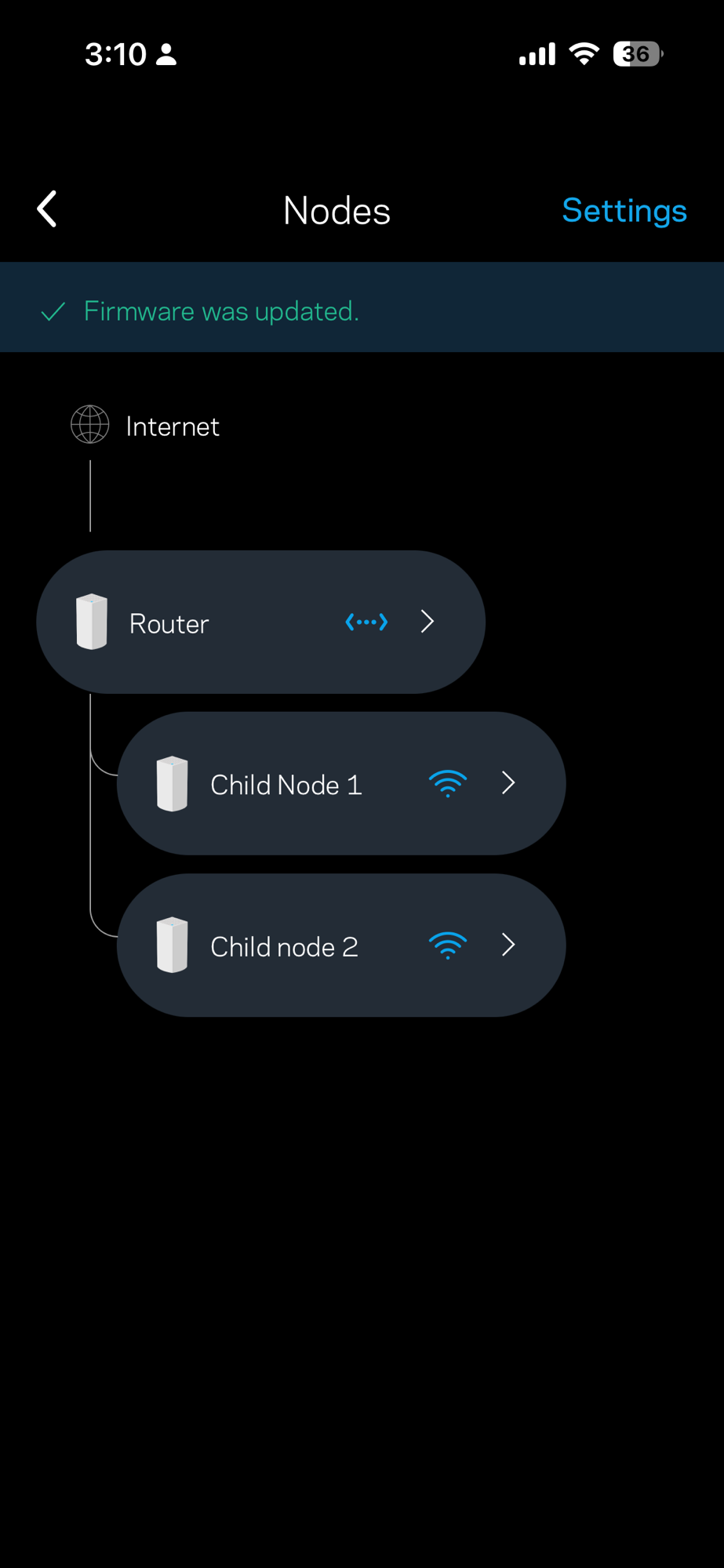
(Update 11-16-2025) Last few days I have encountered some intermittent issues on this Velop Wifi. And unplugging followed by plugging back in didn’t do the trick this time. So I did a reset, basically I factory reset every node to factory setting, and setup the Wifi network again. It seems now the WiFi is working as expected. A bonus point is this time I was able to add the 2nd child node successfully.
I also updated the firmware for one of the nodes. Now I feel like a network engineer 🙂
I also noticed that sometimes the LinkSys app will hang, and my workaround is to delete the app, and installed the app again. It seems did the trick. I did tried to close and re-open a few times. Sometimes that would work too. But “delete and re-install” did solve one hanging issue for me. I know it’s a bit extreme. Overall the app is not the best quality, let me add.
(Original 02-25-2025) I bought the system a while ago from Woot: it’s a refurbished product. Today I decided to set it up.
It’s done mostly via the Linksys app (iOS, android). I only have iOS so I can only comment on iOS: I think it’s good. It prompt me for the 1st node I just plugged in, and the node was also connected to the Internet (via the modem). Mainly I just tap and follow along.
The tricky part is add the 2nd node, my refurbished pack has 2 nodes total. Initially the app cannot find the child node (the 2nd node). Took me a while to realize I need to move this node closer to the parent node, and I did. After that I can see the 2nd node had the “Solid Purple” which means Node is ready for setup: and the rest is the history. Here are the explanations for the different colors.
After the successful pairing I can move the child node upstairs: and hopefully it can make the overall WiFi situation better at my home. Earlier I did try the “repeater mode” for my older Linksys WiFi router but it had some issues.
PS: I found out by default wordpress will use a very old timestamp for my post – it was year 2013 because I just reused it here. Then I updated it by just updating the timestamp.
(Original 2025-01-27) Last week, my 10-year-old accidentally broke her old iPad (iPad gen 7th 32gb space gray). My 14-year-old said partial reason was the case was broken and didn’t provide enough projection. I was not upset about it, as this sort of thing is a part of life nowadays. The iPhone and iPad glasses are fragile, and they tend to break, if they land on hard surfaces. Our old daughter made a similar but slightly more costly mistake on my old iPhone XR about 14 months ago. That’s also how I got my new iPhone 15 shortly after, so that I can give my old iPhone 12 to her.
I did offer her (10-year-old) a new iPad recently as her current one is running out of space and cannot update to newer versions of iOS or iPad OS. That caused some issues such as she could not install certain apps 🙁
How we setup her new iPad (iPad 10th gen, we bought the pink one). Mainly we setup her own Apple account this time. In terms of new iPad setup, I used Mac Mini to transfer a backup copy of her old iPad to Mac Mini, then from Mac Mini I transferred that content to her new iPad. We used the USB cables in both instances (which is faster than Wi-Fi).
Setup her own Apple account took some time. It’s a child account and has less privilege than mine. Initially we tried to log into her new iPad, we were not successful. Took a few attempts. As her dad, I can see her account from my iCloud account.
After setting everything setup, I signed out from her new iPad (old iPad was using my iCloud account). And signed in using her own account. After that I need to authorize her to download couple apps or update them. Also, for Roblox, I believe the minimum age is 12, so I chose 12+ in the initial iPad setup. The rest are mostly default, such as Apple Pay (no credit card for now, which means she needs my attention to buy something).
Last but not least, I plan to bring the broken iPad in my upcoming China summer trip: hopefully I can find someone to fix it in a reasonable cost, and I plan to use it myself. It will be my 2nd personal iPad if it works out. Last summer I did bring back the broken iPhone XR and had it repaired, it worked only for a brief period, and I eventually did sell it on eBay – I explicitly listed the conditions and showed the pictures of the phone there. I may do it same if things don’t work out. At least, I don’t want to sell the broken iPad AS IS. (Update: actually I ended up selling the broken iPad as is, just like how I sold my broken iPhone). In both cases I erase everything from the device, and the buyer is likely going to use the device for the parts. Because although the screen is broken, the buyer can use other parts on the device as they are still good.
Update (12-10-2025) I had to force restart my daughter’s school iPad (this time I refreshed my memory by watching this YouTube video). I suspect the hard case probably has something to do with the iPad being locked up like this. I recall last time (Feb 2025, refer to the above comment), the iPad was also in a hard case (it appears Google Gemini disagree with me on this).
“Locking Up” in Error If you mean the iPad becomes completely unresponsive or frozen, this is a technical issue and generally not a direct result of the case material itself (hard plastic or polycarbonate).”
Btw, I added some comments to the above YouTube video:
This is even better than Apple’s own instructions: which I followed but didn’t work. Note we just need to press (release) the volume down button, then press (release) the volume up button, at last hold the main button. Apple’s instructions led me to do an “extra” push and release – we just need a normal push and release on those 2 volume buttons.
I’m talking about the unlocked iPhones. Because I don’t think the carrier promotions are “cheap” in the sense they usually make the money back from the monthly fees, and then more.
I can think of a few places, some are probably cheaper, but I am not 100% sure about the quality (especially the battery life for the refurbished iPhones). Below are the two places that I trust.
New iPhones at Apple, SE and 14 are two cheaper choices. Personally I think 15 or 16 are probably the better deals.
If one has the Chase sapphire or freedom credit cards and has some Ultimate Rewards (UR) points to spare, from time to time they have promotions for Apple products in the redemption center. It’s another way to get brand new iPhone. Note this may not be the most cost effective way to burn the UR points. But if they do promotion: it means 1 point is worth 1.25 cent during the redemption. If you travel, and could use the UR points, try to use the points there as 1 point is usually worth 2 cents or more there.
Personally I have used UR points for a few iPhones in last few years.
Refurbished
In the order of quality guarantee (top to bottom).
Refurbished iPhone at Apple: it seems they don’t have a lot of iPhones in stock now. Most are the larger or pro models (which are usually more expensive).
Other two places I am aware of refurbished iPhone: eBay and Amazon.
This somewhat reminds me of the preowned certified Toyotas I bought in year 2013 and year 2022.
Insurance
Do we need insurance? I usually insure it by myself (you may read this post if you have some time). Personally if I need insurance: I would buy from Apple instead of the carrier.
But this again reminds me of the one time I bought the “extended warranty” for my 2012 Toyota Sienna (preowned certified) from the dealer. Most of those are not necessary. In the case of iPhone, no pun intended, buy a good case from Amazon is probably the only insurance you need.
Comparing iPad Air and regular iPad – Update 01-04-2025
deals (dealsea iPad) – I end up bought the 11-inch iPad Air from Amazon. It should come in about 10 days and I plan to use it for Kindle, Apple Intelligence etc.
I think I started using T-Mobile probably from year 2012, ever since my 2-year contract with AT&T ended. I got the 2-year contract when I bought iPhone 4 at the Apple Store in fall 2010.
Note with T-Mobile, I did not sign up the data plan. And In year 2014, I started looking at prepaid data plans (with some call minutes, and text messages included), and found H2O.
I don’t recall how exactly I found Mint Mobile, probably because I realized it’s cheaper than H2O. and I decided to switch. That was probably in year 2019. I don’t have complaints with them with 3 exceptions:
1. Their coverage which is about same as T-Mobile (in some areas the coverage is not as good as AT&T or Verizon), also because T-Mobile recently bought Mint Mobile, so I don’t expect them to improve.
2. In one or two occasions, it seems their meter went wrong, because essentially my data was quickly used up as soon as I received the new pot of data for the month. Tried to chat with the customer service via the app, and it was not very helpful either.
They have launched this product called Minternational Pass. And I used it recently in my recent China trip (to be precise, Vancouver, Hong Kong and Mainland China). It’s working for the most part, the nice thing is it’s about $2 or $3 per day, which is much cheaper than the Visible Global Pass or Verizon international roaming (which is $10 a day; $5 day in Canada and Mexico). Note Mint Mobile recently included Canada roaming for free. So if we only talk about the international roaming, Mint Mobile is cheaper. But we also keep in mind the length of the international travel, as well as the country.
Apple Watch Cellular
I found the below 2 carriers when I was doing research for my Apple Watch cellular, and potentially for my 10-year standalone Apple Watch Cellular. I think I may switch myself from Mint Mobile to one of the two below, so that I can travel or go out with my watch only, from time to time.
It seems we have to buy Apple Watch from them (as opposed to Visible we can bring our own watch). They do have a nice section about kids using watch or phone (around safety etc.).